> ## Documentation Index
> Fetch the complete documentation index at: https://nusaai-edit.mintlify.site/llms.txt
> Use this file to discover all available pages before exploring further.
# Code Interpreter
> > Learn how using Neosantara And E2B Code Interpreter
[](https://colab.research.google.com/drive/1r5I11nX5_W6xBKUX-0uPF4S6yjRImVu8?usp=sharing)
## Overview
This guide explains how to use the **Neosantara** and **E2B Code Interpreter SDK** to create a secure cloud sandbox powered by [Firecracker](https://github.com/firecracker-microvm/firecracker). The sandbox includes a running Jupyter server, enabling large language models (LLMs) to execute Python code for tasks such as data analysis and visualization.
***
## Prerequisites
To get started, ensure you have the following:
Sign up at [Neosantara](https://app.neosantara.xyz/api-keys) to receive **10,000 free Token Credits** monthly. No credit card required.
Obtain an API key from [E2B](https://e2b.dev/docs) to use the Code Interpreter.
* **Node.js**: Version 16 or higher.
* **Python**: Version 3.6 or higher.
* **Required Python Packages**:
* [`openai`](https://pypi.org/project/openai/): For interacting with Neosantara's API.
* [`e2b_code_interpreter`](https://pypi.org/project/e2b-code-interpreter/): For running code in the E2B sandbox.
* [`python-dotenv`](https://pypi.org/project/python-dotenv/): For managing environment variables.
***
## Installation
Install the required Python packages using pip:
```bash icon="terminal" theme={null}
pip install e2b_code_interpreter==1.0.0 python-dotenv openai -q
```
For additional details on available methods, refer to the [E2B documentation](https://e2b.dev/docs/quickstart).
***
## Setup Instructions
Create a new file, e.g., `index.py`, to hold your code. Ensure the file has a `.py` extension.
The script name can be customized (e.g., `index.py` or `my_script.py`), but it must be a valid `.py` file.
Create a `.env` file in your project directory to store your API keys:
```env theme={null}
NAI_API_KEY=your_neosantara_api_key
E2B_API_KEY=your_e2b_api_key
```
Replace `your_neosantara_api_key` and `your_e2b_api_key` with the keys obtained from [Neosantara](https://app.neosantara.xyz/api-keys) and [E2B](https://e2b.dev/docs), respectively.
Choose a code generation model from Neosantara. Available options include:
* `nusantara-base` (default)
* `archipelago-70b`
* `Llama-3.3-Nemotron-Super-49B`
See the full list of models at [Neosantara Models](https://www.neosantara.xyz/models).
The code interpreter uses a dataset located at `/home/user/data.csv` in the sandbox. The CSV file uses a comma (`,`) as the delimiter and contains the following columns:
| Column Name | Example Value | Description |
| --------------------------------------------------- | --------------------- | ------------------------------------------------------- |
| `country` | Argentina, Australia | Country name |
| `Region` | SouthAmerica, Oceania | Geographic region |
| `Surface area (km2)` | 2780400 | Land area in square kilometers |
| `Population in thousands (2017)` | 44271 | Population in thousands |
| `Population density (per km2, 2017)` | 16.2 | People per square kilometer |
| `Sex ratio (m per 100 f, 2017)` | 95.9 | Male-to-female ratio |
| `GDP: Gross domestic product (million current US$)` | 632343 | GDP in million USD |
| `GDP per capita (current US$)` | 14564.5 | GDP per person |
| `Life expectancy at birth, total (years)` | 76.4 | Average life expectancy |
| ... (and more) | | See the full list in the [example code](#example-code). |
***
## Example Code
Below is a complete example demonstrating how to set up the Code Interpreter, upload a dataset, and create a visualization (e.g., a linear regression chart of GDP per capita vs. life expectancy).
````python icon="python" theme={null}
import os
from dotenv import load_dotenv
from openai import OpenAI
from e2b_code_interpreter import Sandbox
import re
import json
# Load environment variables
load_dotenv()
# API keys
NAI_API_KEY = os.getenv("NAI_API_KEY")
E2B_API_KEY = os.getenv("E2B_API_KEY")
# Model selection
MODEL_NAME = 'nusantara-base' # Alternatives: 'archipelago-70b', 'Llama-3.3-Nemotron-Super-49B'
# System prompt for the LLM
SYSTEM_PROMPT = """You're a Python data scientist. You are given tasks to complete and you run Python code to solve them.
Information about the csv dataset:
- It's in the `/home/user/data.csv` file
- The CSV file is using , as the delimiter
- It has the following columns (examples included):
- country: "Argentina", "Australia"
- Region: "SouthAmerica", "Oceania"
- Surface area (km2): for example, 2780400
- Population in thousands (2017): for example, 44271
- Population density (per km2, 2017): for example, 16.2
- Sex ratio (m per 100 f, 2017): for example, 95.9
- GDP: Gross domestic product (million current US$): for example, 632343
- GDP growth rate (annual %, const. 2005 prices): for example, 2.4
- GDP per capita (current US$): for example, 14564.5
- Economy: Agriculture (% of GVA): for example, 10.0
- Economy: Industry (% of GVA): for example, 28.1
- Economy: Services and other activity (% of GVA): for example, 61.9
- Employment: Agriculture (% of employed): for example, 4.8
- Employment: Industry (% of employed): for example, 20.6
- Employment: Services (% of employed): for example, 74.7
- Unemployment (% of labour force): for example, 8.5
- Employment: Female (% of employed): for example, 43.7
- Employment: Male (% of employed): for example, 56.3
- Labour force participation (female %): for example, 48.5
- Labour force participation (male %): for example, 71.1
- International trade: Imports (million US$): for example, 59253
- International trade: Exports (million US$): for example, 57802
- International trade: Balance (million US$): for example, -1451
- Education: Government expenditure (% of GDP): for example, 5.3
- Health: Total expenditure (% of GDP): for example, 8.1
- Health: Government expenditure (% of total health expenditure): for example, 69.2
- Health: Private expenditure (% of total health expenditure): for example, 30.8
- Health: Out-of-pocket expenditure (% of total health expenditure): for example, 20.2
- Health: External health expenditure (% of total health expenditure): for example, 0.2
- Education: Primary gross enrollment ratio (f/m per 100 pop): for example, 111.5/107.6
- Education: Secondary gross enrollment ratio (f/m per 100 pop): for example, 104.7/98.9
- Education: Tertiary gross enrollment ratio (f/m per 100 pop): for example, 90.5/72.3
- Education: Mean years of schooling (female): for example, 10.4
- Education: Mean years of schooling (male): for example, 9.7
- Urban population (% of total population): for example, 91.7
- Population growth rate (annual %): for example, 0.9
- Fertility rate (births per woman): for example, 2.3
- Infant mortality rate (per 1,000 live births): for example, 8.9
- Life expectancy at birth, female (years): for example, 79.7
- Life expectancy at birth, male (years): for example, 72.9
- Life expectancy at birth, total (years): for example, 76.4
- Military expenditure (% of GDP): for example, 0.9
- Population, female: for example, 22572521
- Population, male: for example, 21472290
- Tax revenue (% of GDP): for example, 11.0
- Taxes on income, profits and capital gains (% of revenue): for example, 12.9
- Urban population (% of total population): for example, 91.7
Generally, you follow these rules:
- ALWAYS FORMAT YOUR RESPONSE IN MARKDOWN
- ALWAYS RESPOND ONLY WITH CODE IN CODE BLOCK LIKE THIS:
`\`\`python
{code}
`\`\`
- The Python code runs in a Jupyter notebook.
- Each Python code block is executed in a separate cell.
- Display visualizations using matplotlib or other libraries directly in the notebook.
- You have access to the internet and can make API requests.
- You can read/write files in the sandbox filesystem.
- Install any pip package using `!pip install {package}` if needed (common data analysis packages are preinstalled).
- All code runs in a secure sandbox environment.
"""
# Function to execute code in the sandbox
def code_interpret(e2b_code_interpreter, code):
print("Running code interpreter...")
exec = e2b_code_interpreter.run_code(
code,
on_stderr=lambda stderr: print("[Code Interpreter] Error:", stderr),
on_stdout=lambda stdout: print("[Code Interpreter] Output:", stdout),
)
if exec.error:
print("[Code Interpreter ERROR]", exec.error)
return None
return exec.results
# Function to extract Python code from LLM response
def match_code_blocks(llm_response):
pattern = re.compile(r"```python
match = pattern.search(llm_response)
return match.group(1) if match else ""
# Function to interact with the LLM and execute code
def chat_with_llm(e2b_code_interpreter, user_message):
print(f"\n{'='*50}\nUser message: {user_message}\n{'='*50}")
messages = [
{"role": "system", "content": SYSTEM_PROMPT},
{"role": "user", "content": user_message},
]
client = OpenAI(api_key=NAI_API_KEY, base_url="https://api.neosantara.xyz/v1")
response = client.chat.completions.create(model=MODEL_NAME, messages=messages)
response_message = response.choices[0].message
python_code = match_code_blocks(response_message.content)
if python_code:
return code_interpret(e2b_code_interpreter, python_code)
else:
print(f"No Python code found in response: {response_message}")
return []
# Function to upload dataset to the sandbox
def upload_dataset(code_interpreter):
print("Uploading dataset to Code Interpreter sandbox...")
dataset_path = "./data.csv"
if not os.path.exists(dataset_path):
raise FileNotFoundError("Dataset file not found at ./data.csv")
try:
with open(dataset_path, "rb") as f:
file_buffer = f.read()
remote_path = code_interpreter.files.write('data.csv', file_buffer)
if not remote_path:
raise ValueError("Failed to upload dataset")
print("Dataset uploaded to:", remote_path)
return remote_path
except Exception as error:
print("Error during file upload:", error)
raise error
# Main execution
with Sandbox(api_key=E2B_API_KEY) as code_interpreter:
# Upload dataset
upload_dataset(code_interpreter)
# Example task: Create a linear regression chart
code_results = chat_with_llm(
code_interpreter,
"Create a chart showing the linear regression of GDP per capita vs. life expectancy from the dataset. Filter out missing or invalid values.",
)
if code_results:
first_result = code_results[0]
print("Visualization generated successfully!")
else:
raise Exception("No results from code interpreter")
# Display the visualization (e.g., PNG output)
first_result
````
***
## Running the Code
1. **Ensure the dataset** (`data.csv`) is in the same directory as your script.
2. **Run the script** using:
```bash theme={null}
python index.py
```
3. **View the output**: The script uploads the dataset, sends a task to the LLM, executes the generated Python code in the sandbox, and displays the result (e.g., a chart).
### Example Output
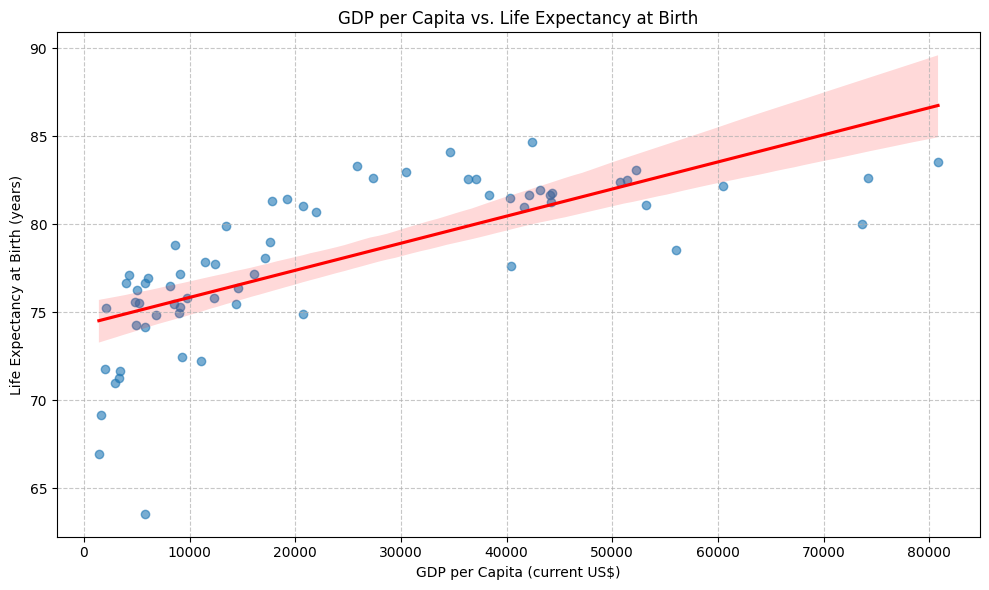
The example task generates a scatter plot with a linear regression line showing the relationship between GDP per capita and life expectancy, filtered for valid data.
 ***
## Key Features
* **Secure Sandbox**: Code runs in an isolated environment powered by Firecracker.
* **Jupyter Integration**: Execute Python code in a Jupyter notebook within the sandbox.
* **Data Visualization**: Use libraries like `matplotlib` or `seaborn` to create charts directly in the notebook.
* **File Access**: Read/write files in the sandbox filesystem.
* **API Support**: Make API requests from within the sandbox.
* **Extensibility**: Install additional Python packages using `!pip install`.
***
## Troubleshooting
* **API Key Issues**: Ensure your Neosantara and E2B API keys are valid and correctly set in the `.env` file.
* **Dataset Not Found**: Verify that `data.csv` exists in the script's directory.
* **Code Execution Errors**: Check the console for error messages from the sandbox (`[Code Interpreter ERROR]`).
* **Missing Python Code**: If the LLM response lacks a Python code block, ensure your prompt is clear and specific.
For further assistance, refer to the [E2B documentation](https://e2b.dev/docs) or [Neosantara support](https://www.neosantara.xyz/contact).
***
## Key Features
* **Secure Sandbox**: Code runs in an isolated environment powered by Firecracker.
* **Jupyter Integration**: Execute Python code in a Jupyter notebook within the sandbox.
* **Data Visualization**: Use libraries like `matplotlib` or `seaborn` to create charts directly in the notebook.
* **File Access**: Read/write files in the sandbox filesystem.
* **API Support**: Make API requests from within the sandbox.
* **Extensibility**: Install additional Python packages using `!pip install`.
***
## Troubleshooting
* **API Key Issues**: Ensure your Neosantara and E2B API keys are valid and correctly set in the `.env` file.
* **Dataset Not Found**: Verify that `data.csv` exists in the script's directory.
* **Code Execution Errors**: Check the console for error messages from the sandbox (`[Code Interpreter ERROR]`).
* **Missing Python Code**: If the LLM response lacks a Python code block, ensure your prompt is clear and specific.
For further assistance, refer to the [E2B documentation](https://e2b.dev/docs) or [Neosantara support](https://www.neosantara.xyz/contact).