


Overview
This guide explains how to use the Neosantara and E2B Code Interpreter SDK to create a secure cloud sandbox powered by Firecracker. The sandbox includes a running Jupyter server, enabling large language models (LLMs) to execute Python code for tasks such as data analysis and visualization.Prerequisites
To get started, ensure you have the following:Get Your Free Neosantara API Key
Sign up at Neosantara to receive 10,000 free Token Credits monthly. No credit card required.
Get Your E2B API Key
Obtain an API key from E2B to use the Code Interpreter.
- Node.js: Version 16 or higher.
- Python: Version 3.6 or higher.
- Required Python Packages:
openai: For interacting with Neosantara’s API.e2b_code_interpreter: For running code in the E2B sandbox.python-dotenv: For managing environment variables.
Installation
Install the required Python packages using pip:Setup Instructions
1
Create a Python Script
Create a new file, e.g.,
index.py, to hold your code. Ensure the file has a .py extension.The script name can be customized (e.g.,
index.py or my_script.py), but it must be a valid .py file.2
Configure Environment Variables
Create a Replace
.env file in your project directory to store your API keys:your_neosantara_api_key and your_e2b_api_key with the keys obtained from Neosantara and E2B, respectively.3
Select a Model
Choose a code generation model from Neosantara. Available options include:
nusantara-base(default)archipelago-70bLlama-3.3-Nemotron-Super-49B
4
Dataset Information
The code interpreter uses a dataset located at
/home/user/data.csv in the sandbox. The CSV file uses a comma (,) as the delimiter and contains the following columns:Example Code
Below is a complete example demonstrating how to set up the Code Interpreter, upload a dataset, and create a visualization (e.g., a linear regression chart of GDP per capita vs. life expectancy).Running the Code
- Ensure the dataset (
data.csv) is in the same directory as your script. - Run the script using:
- View the output: The script uploads the dataset, sends a task to the LLM, executes the generated Python code in the sandbox, and displays the result (e.g., a chart).
Example Output
The example task generates a scatter plot with a linear regression line showing the relationship between GDP per capita and life expectancy, filtered for valid data.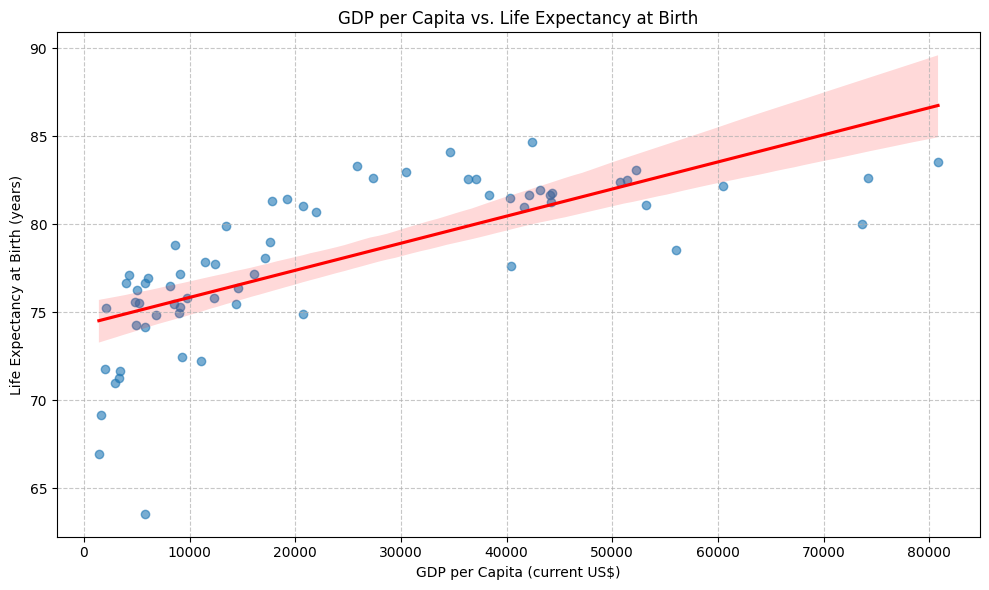
Key Features
- Secure Sandbox: Code runs in an isolated environment powered by Firecracker.
- Jupyter Integration: Execute Python code in a Jupyter notebook within the sandbox.
- Data Visualization: Use libraries like
matplotliborseabornto create charts directly in the notebook. - File Access: Read/write files in the sandbox filesystem.
- API Support: Make API requests from within the sandbox.
- Extensibility: Install additional Python packages using
!pip install.
Troubleshooting
- API Key Issues: Ensure your Neosantara and E2B API keys are valid and correctly set in the
.envfile. - Dataset Not Found: Verify that
data.csvexists in the script’s directory. - Code Execution Errors: Check the console for error messages from the sandbox (
[Code Interpreter ERROR]). - Missing Python Code: If the LLM response lacks a Python code block, ensure your prompt is clear and specific.